Your VoiceMap publisher dashboard gives you complete visibility into every tour download. Whether you’re checking how a single tour is performing or analysing your overall trends, everything you need is in one place.
On voicemap.me/dashboard/report, you’ll see:
- A summary of your total tour sales, outstanding royalties, and total downloads
- Real-time report showing all tour downloads and royalties
- How listeners downloaded your tour (in-app, web, reseller, etc.)
This guide walks you through each section of your download report.
Understanding the dashboard #
You can toggle between your tour downloads and royalties on the Monthly Breakdown chart. Underneath that, you’ll see a download breakdown for each tour, like the example below.
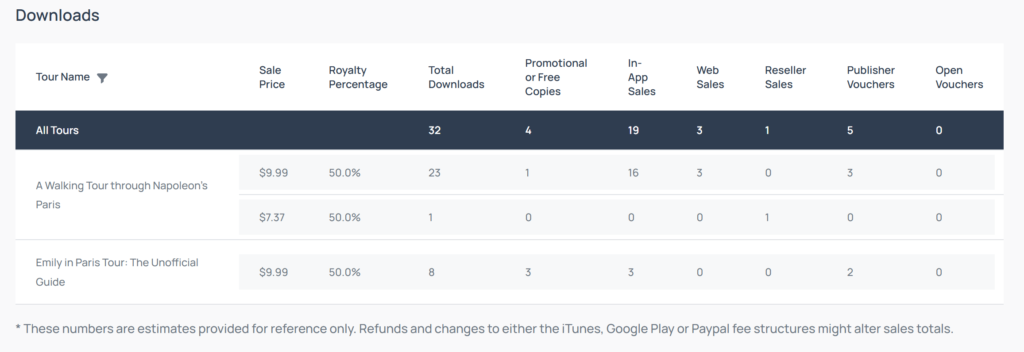
Here’s what each term on your Downloads breakdown means:
- Sales Price: The price paid for the sales in that row. If you have changed the price of your tour over time, the different prices will appear as different rows. You’ll also see different prices for downloads through different channels (the apps, resellers, etc.), due to the different transaction charges the channels apply.
- Royalty Percentage: Your royalty is calculated by multiplying this percentage by the sales price after deducting payment processing fees (from app stores and Stripe).
- Total Downloads: The total number of tour copies that have been downloaded at the specific sales price, across all channels.
- Promotional or Free Copies: Number of tour downloads from free tour coupon codes. These include free payments, when someone in the VoiceMap team downloads a copy for testing, manual royalties, and share-with-friend codes (SWF). At the time of writing, VoiceMap gives a royalty of $0.35 per SWF download.
- In-App Sales: Sales on the iOS and Android apps. Apple and Google currently take a 15% commission from these purchases.
- Web Sales: Sales directly from the VoiceMap website. Website purchases are processed by Stripe, which charges 3.4% plus $0.50 SGD per transaction. ($0.50 SGD is roughly $0.35 USD, but when the exchange rate moves, it can be a few cents higher or lower.)
- Reseller Sales: When a third-party reseller, such as Tripadvisor or a museum, sells your tour, your royalties are awarded when the coupon code is redeemed. Online Travel Agencies (OTAs) like Viator, Musement, and Klook charge a base commission rate between 20% and 25%, though they might charge more for greater visibility.
- Publisher Vouchers: When a publisher purchases vouchers from VoiceMap for resale, the total number of paid redemptions is counted here.
- Open Vouchers: When a listener purchases your tour as part of a bulk coupon, such as a gift voucher, it reflects here.
A spreadsheet for estimating your revenue based on the various types of sales is available here.
Frequently asked questions #
Does VoiceMap charge payment processing fees?
No, VoiceMap doesn’t charge processing fees – these come from third-party payment processors. When listeners purchase through the website, Stripe charges 3.4% plus $0.50 SGD per transaction. For in-app purchases, Apple and Google charge a 15% commission. Your royalty percentage is calculated after these external fees are deducted.
Why do I see different prices for my tour on my dashboard?
You’ll see different prices because of two reasons:
- When you’ve changed your tour price it appears as a separate row
- Different prices appear because we show you the amount after sales channel fees are deducted – this is what your royalty is calculated from.
For example: Let’s say your tour costs $9.99. When it’s listed on a reseller like TripAdvisor, your dashboard shows $7.99 (after their commission). Then your royalty percentage applies to that $7.99, so you’d earn $3.99 (50% royalty split on Basic/Growth/Priority/Pro) or $5.19 (65% royalty split on Premium).
How can I export my tour downloads and royalties data?
You can download CSV files of your monthly downloads and royalties dating back to when each tour was published. Simply click Export Downloads or Export Royalties on the right side above your Monthly Breakdown chart on your dashboard. These reports include the total monthly sales and royalties per tour.
What are publisher vouchers and how do they work?
Publisher vouchers are codes listeners can use to redeem your tours. These include:
- Free promotional vouchers: You receive ten free vouchers when you create a tour and another ten when you publish it. These are excellent tools for promoting your tour and gathering early reviews.
- Purchased vouchers: You can also purchase vouchers from VoiceMap to resell directly through your own channels, such as your personal website. Read more about publisher vouchers here.
How do gift vouchers affect my tour royalties?
Listeners can purchase gift vouchers that can be redeemed for most tours on VoiceMap. Gift vouchers range from $24.99 (for 3 tours) to $99.99 (for 20 tours). You’ll see different sales prices on your dashboard depending on which gift voucher package your tour is part of. For example, if your tour is redeemed as part of a 3-tour gift voucher, you’ll receive 50% royalties on $7.93 (the amount after transaction fees and the bulk discount are subtracted).
Where can I see downloads for tours that are part of a bundle?
Bundle purchases are tracked as either in-app purchases or web purchases on your dashboard, depending on where the bundle was bought. Each tour included in the bundle will show the purchase individually, with discounts and transaction fees already subtracted from the sales price. If you’re interested in creating a tour bundle, have a read on our publisher forum.
How do Share With Friend (SWF) codes work for publishers?
When a new listener signs up and completes a tour using a friend’s referral code, that friend receives a free tour credit. SWF codes are a great way to attract new listeners to VoiceMap tours. You’ll earn $0.35 per SWF download of your tour. Since SWF downloads make up a small portion of overall downloads, you probably won’t see many of these on your dashboard compared to other sale types.
Why is there a negative (-) transaction on my royalty report?
Don’t worry, a negative transaction doesn’t mean you owe us money. In fact, it’s the opposite. There are three reasons you might see one:
- Manual reseller codes: Sometimes we need to manually provide a code due to a reseller connection issue. Because of how it’s structured in the system, it shows as a negative on your end, but it’s actually an amount we owe you. We’ll add this to your royalty report as an additional payment.
- Group purchases: When someone buys multiple copies of your tour at a discount (15% off for 2-20 copies, 25% off for 21-100 copies, or 50% off for 100+ copies), it may appear as a negative transaction. This will also be added to your royalty report as an amount we owe you.
- Licensing agreements: If you have any licensing agreements for your tour with hotels or other businesses, they’ll also appear as a negative transaction.
All three of these will also appear on your Payouts tab, so you’ll know exactly what the transaction refers to.
Why has a reseller sale disappeared from my dashboard?
As part of our agreements with resellers, we offer standard refunds to listeners when eligible under our refund policy. Sometimes listeners purchasing through platforms like TripAdvisor mistake a VoiceMap tour for an entry ticket, or their travel plans change. In these cases, we may issue a refund, which is why you’ll occasionally see a sale appear and then disappear from your dashboard. This happens to only a small percentage of reseller sales, so it shouldn’t significantly impact your overall royalties.